


Building a JS calculator is one of the best beginner projects for learning JavaScript. It helps you understand how HTML, CSS, and JavaScript work together to create interactive web applications. In this tutorial, you’ll learn how to build a simple calculator step by step using clean and beginner-friendly code.
Before starting this project, you can read JavaScript Functions to understand how functions work in JavaScript.
What You Will Build
This calculator will be able to:
- Add numbers
- Subtract numbers
- Multiply numbers
- Divide numbers
- Clear the screen
HTML Structure
First, create the calculator layout using HTML.
<!DOCTYPE html>
<html lang="en">
<head>
  <meta charset="UTF-8">
  <meta name="viewport" content="width=device-width, initial-scale=1.0">
  <title>JS Calculator</title>
  <link rel="stylesheet" href="style.css">
</head>
<body>

<div class="calculator">
  <input type="text" id="display" disabled>

  <div class="buttons">
    <button onclick="clearDisplay()">C</button>
    <button onclick="appendValue('/')">/</button>
    <button onclick="appendValue('*')">*</button>
    <button onclick="appendValue('-')">-</button>

    <button onclick="appendValue('7')">7</button>
    <button onclick="appendValue('8')">8</button>
    <button onclick="appendValue('9')">9</button>
    <button onclick="appendValue('+')">+</button>

    <button onclick="appendValue('4')">4</button>
    <button onclick="appendValue('5')">5</button>
    <button onclick="appendValue('6')">6</button>
    <button onclick="calculate()">=</button>

    <button onclick="appendValue('1')">1</button>
    <button onclick="appendValue('2')">2</button>
    <button onclick="appendValue('3')">3</button>
    <button onclick="appendValue('0')">0</button>
  </div>
</div>

<script src="script.js"></script>
</body>
</html>
To understand webpage structure better, you can also read HTML Basics: Structure of a Web Page.
CSS Styling
Now, style the calculator using CSS.
body {
  display: flex;
  justify-content: center;
  align-items: center;
  height: 100vh;
  background: #f4f4f4;
  font-family: Arial, sans-serif;
}

.calculator {
  background: white;
  padding: 20px;
  border-radius: 10px;
  width: 300px;
}

#display {
  width: 100%;
  height: 50px;
  margin-bottom: 15px;
  text-align: right;
  font-size: 24px;
  padding: 5px;
}

.buttons {
  display: grid;
  grid-template-columns: repeat(4, 1fr);
  gap: 10px;
}

button {
  padding: 15px;
  font-size: 18px;
  cursor: pointer;
}
For better layouts, you can explore CSS Grid Layout: Beginner to Advanced Guide.
JavaScript Functionality
Now, add calculator functionality using JavaScript.
const display = document.getElementById("display");

function appendValue(value) {
  display.value += value;
}

function clearDisplay() {
  display.value = "";
}

function calculate() {
  try {
    display.value = eval(display.value);
  } catch {
    display.value = "Error";
  }
}
This script:
- Adds numbers/operators to display
- Clears display
- Calculates result
How the Calculator Works
appendValue()
Adds clicked values to the screen.
clearDisplay()
Resets the calculator display.
calculate()
Uses eval() to calculate the result.
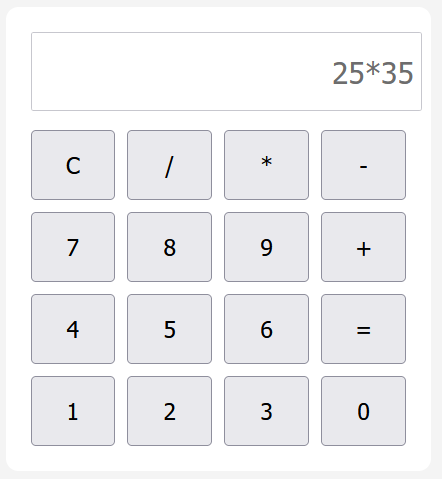
Output
Practical Learning Benefits
Building this project helps you learn:
- DOM manipulation
- Event handling
- Functions
- Basic UI design
- JavaScript logic
You can also read DOM Manipulation for deeper understanding.
Common Mistakes Beginners Make
- Forgetting to connect JS file
- Incorrect button onclick values
- Missing CSS grid structure
- Using invalid expressions
Best Practices
- Keep HTML, CSS, and JS separate
- Use meaningful function names
- Validate user input
- Avoid overcomplicating logic
Tips for Better Learning
- Add dark mode to the calculator
- Add keyboard support
- Improve design with animations
- Build more mini projects
Conclusion
Creating a JS calculator is a great beginner project for understanding how frontend web development works. It combines HTML for structure, CSS for styling, and JavaScript for functionality. With practice, you can expand this project into a scientific or advanced calculator.
Download Full Project Source Code
Get complete project source code files, reusable resources and implementation examples.
Preparing Secure Download 10